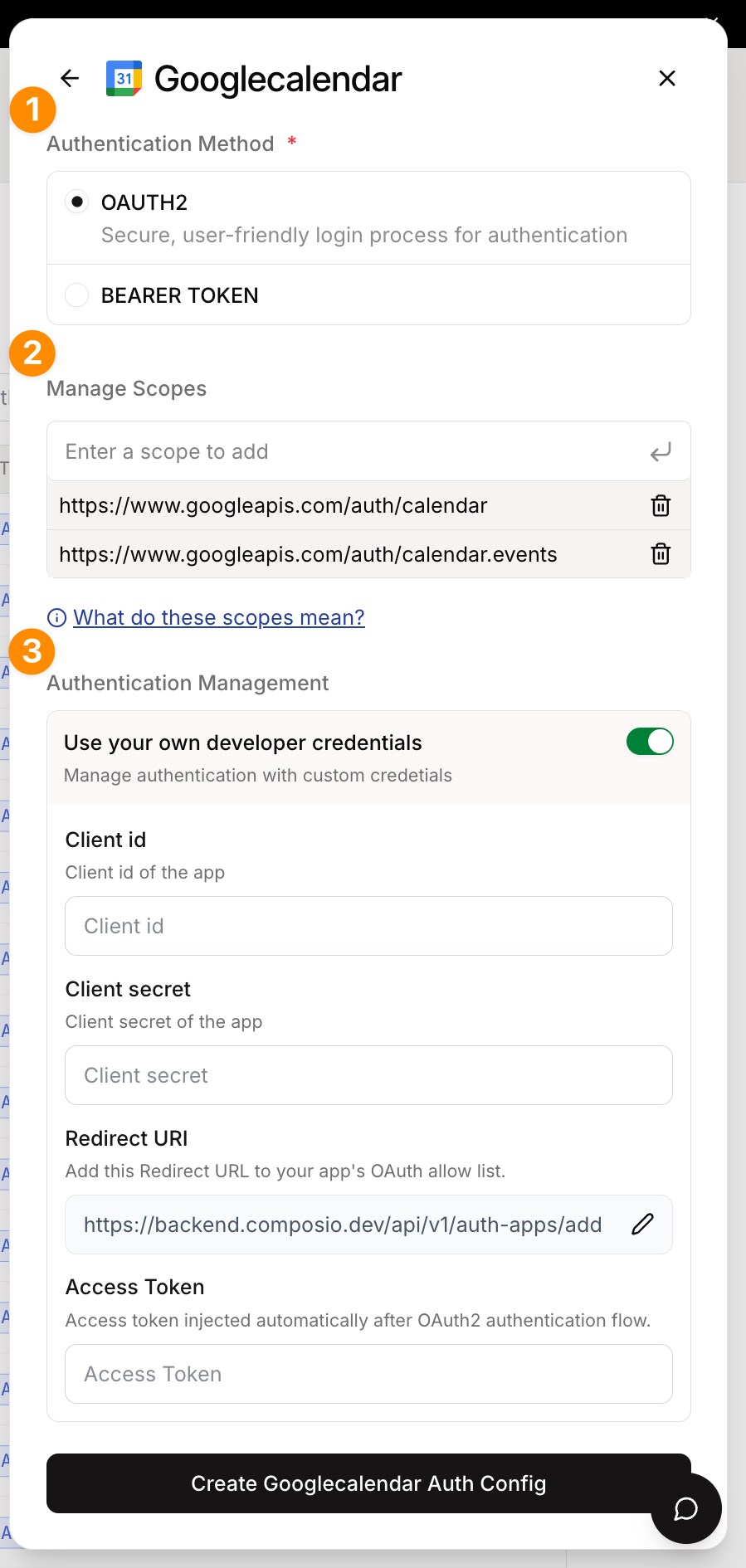
To create a custom auth config, click Create Auth Config in your dashboard, then navigate to Authentication management → Manage authentication with custom credentials.
You'll need to customize the auth config when you want to use different values than the defaults - such as your own subdomain, base URL, client ID, client secret, etc.
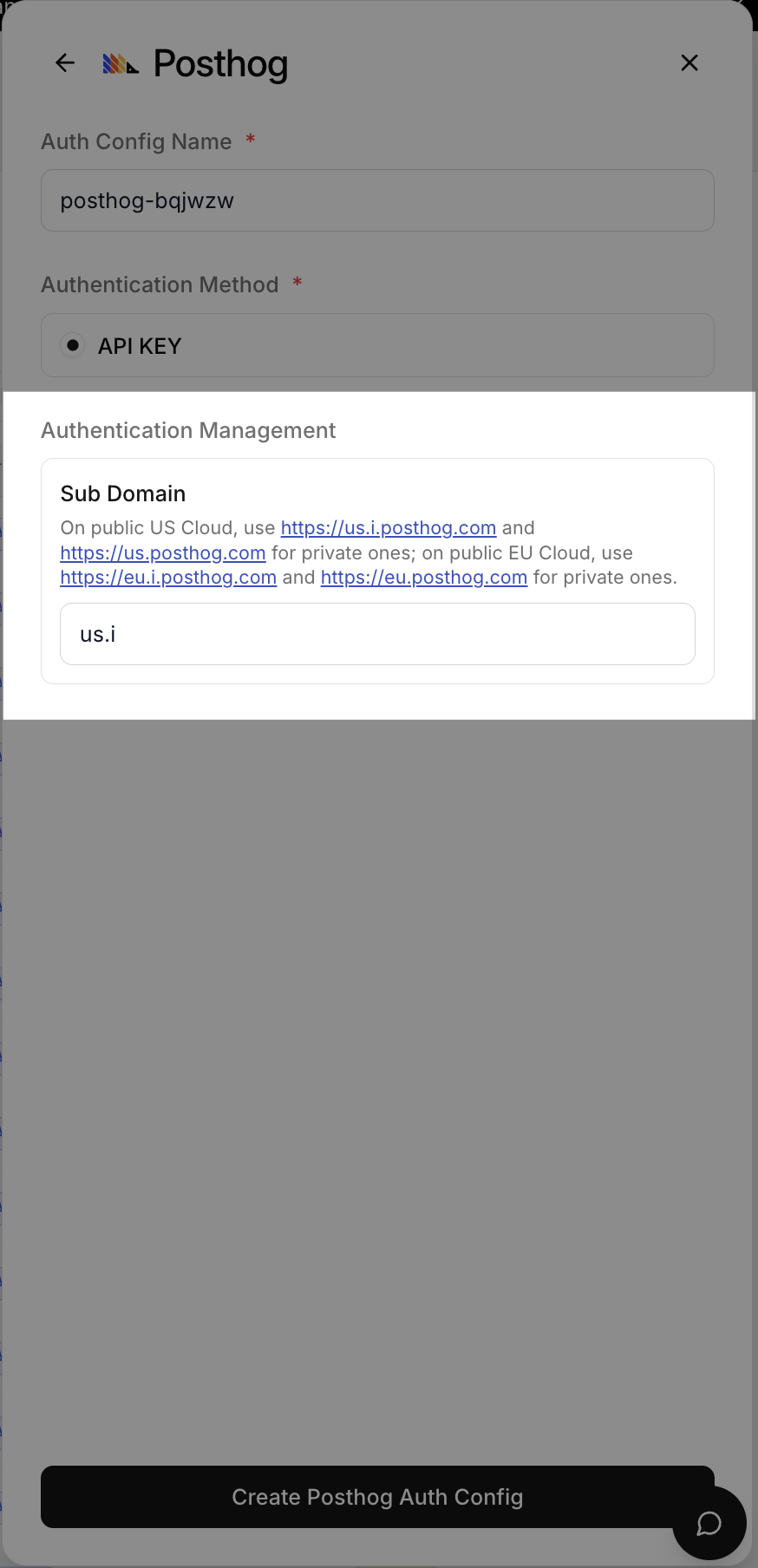
You may change the subdomain for the PostHog toolkit to match your own instance.
PostHog Auth Config Settings
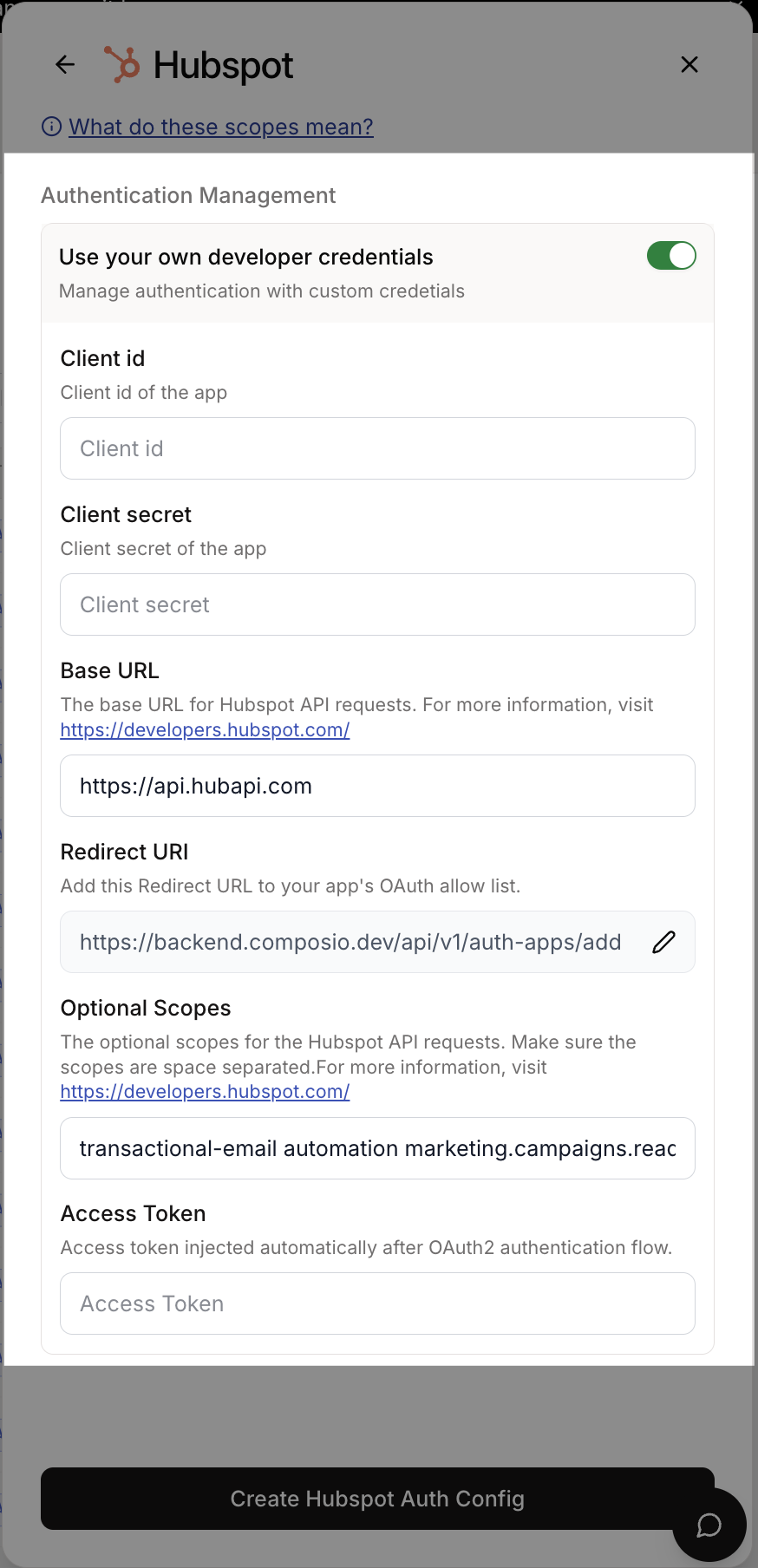
For Hubspot you may customize everything here. For each auth scheme there is a different set of fields.
If you choose to use your own developer app for the OAuth2 scheme, you will have to provide the client ID and client secret.
Hubspot Auth Config Settings
Toolkits that support OAuth2 allow using your own developer app. This is the recommended approach for most cases.
Use your own developer app!
We recommend using your own developer app for the OAuth2 scheme as it is more suited for production usage with many users and more granular control over scopes.
However, getting OAuth approvals takes time, so Composio provides a default developer app!
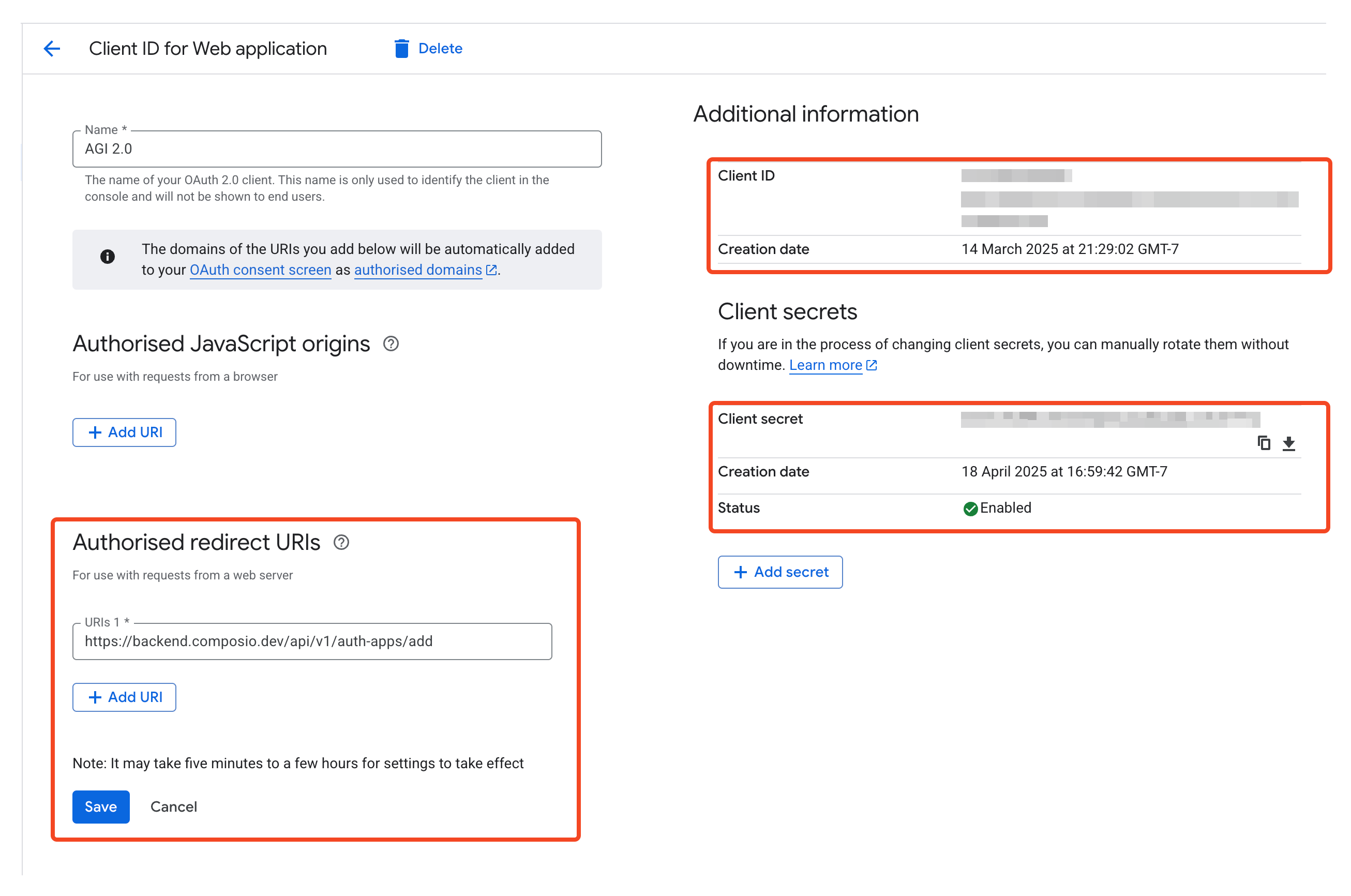
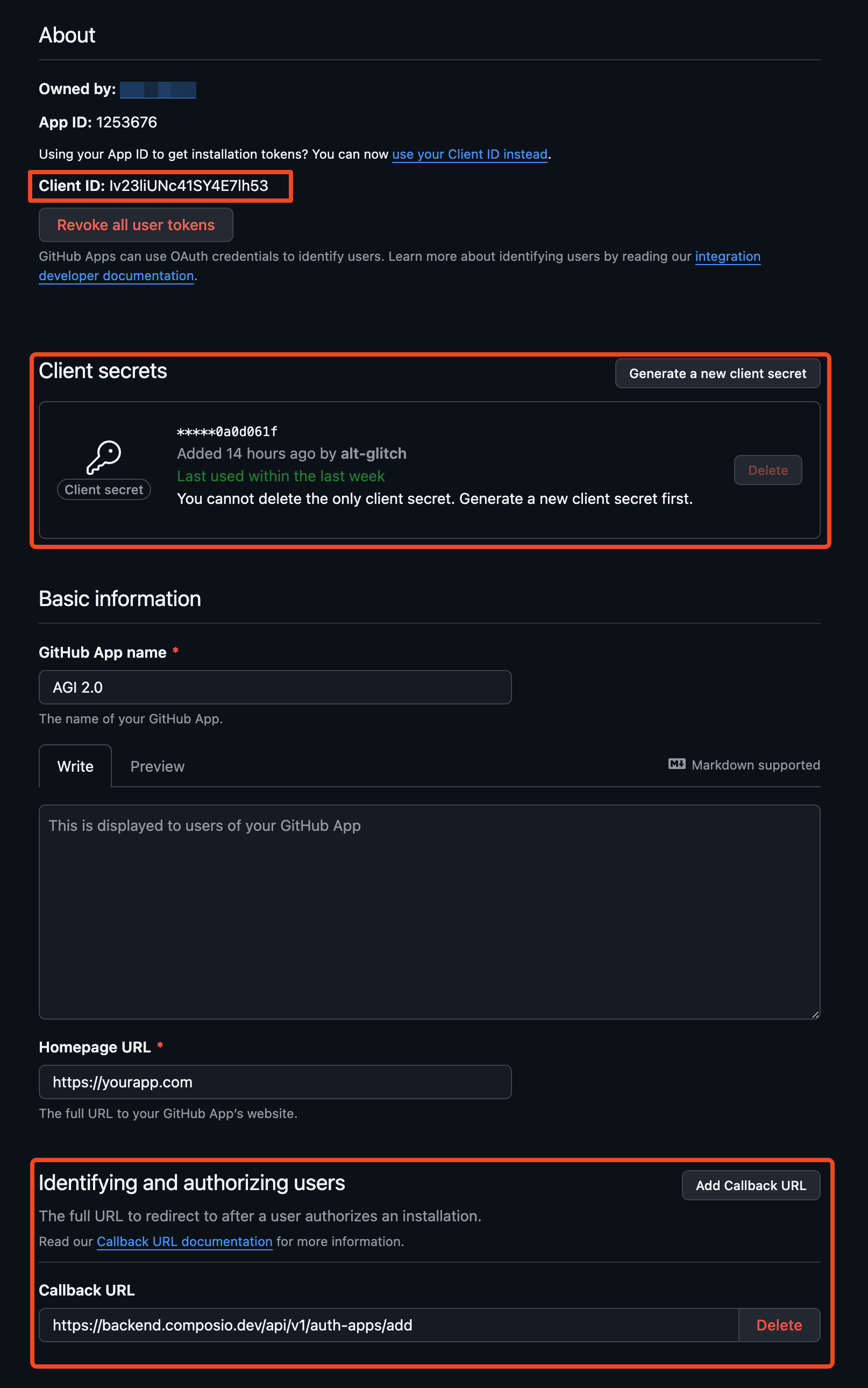
Once you have the OAuth credentials, you can add them to the auth config in the dashboard.
Select the OAuth2 scheme.
Select the scopes to request from users. Default scopes are pre-filled for most apps.
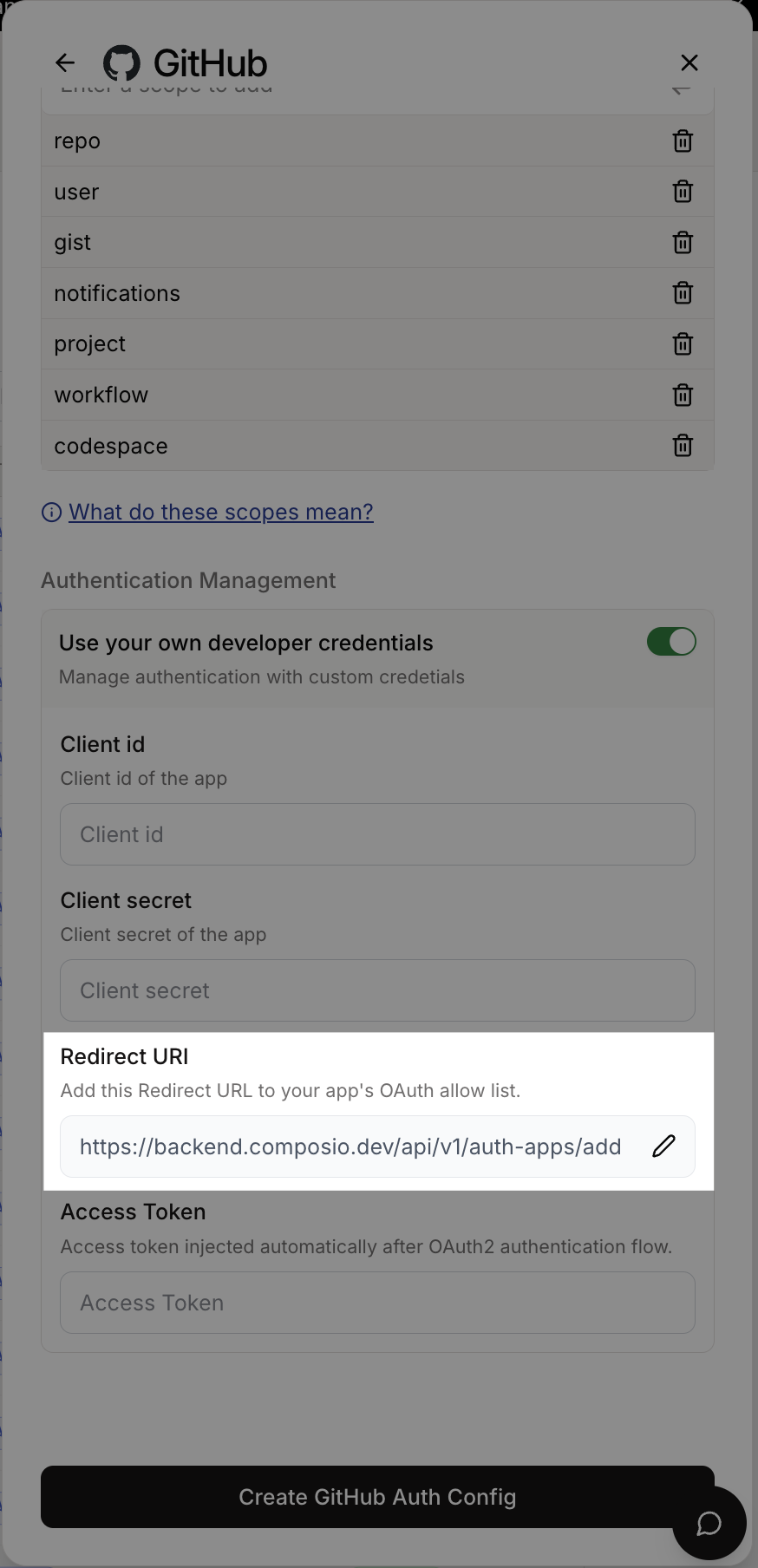
Add the OAuth client ID and client secret for your developer app. Keep the redirect URL as is for now!
Click Create!
Auth Config Settings
This auth config is now ready to be used in your application!
# Create a new connected accountconnection_request = composio.connected_accounts.initiate( user_id="user_id", auth_config_id="ac_1234",)print(connection_request)# Wait for the connection to be establishedconnected_account = connection_request.wait_for_connection()print(connected_account)
Compound function to create a new connected account.
This function creates a new connected account and returns a connection request.
Users can then wait for the connection to be established using the `waitForConnection` method.
@paramuserId - User ID of the connected account@paramauthConfigId - Auth config ID of the connected account@paramoptions - Options for creating a new connected account@returnsConnection request object@example```typescript
// For OAuth2 authentication
const connectionRequest = await composio.connectedAccounts.initiate(
'user_123',
'auth_config_123',
{
callbackUrl: 'https://your-app.com/callback',
config: AuthScheme.OAuth2({
access_token: 'your_access_token',
token_type: 'Bearer'
})
}
);
// For API Key authentication
const connectionRequest = await composio.connectedAccounts.initiate(
'user_123',
'auth_config_123',
{
config: AuthScheme.ApiKey({
api_key: 'your_api_key'
})
}
);
// For Basic authentication
const connectionRequest = await composio.connectedAccounts.initiate(
'user_123',
'auth_config_123',
{
config: AuthScheme.Basic({
username: 'your_username',
password: 'your_password'
})
}
);
```@linkhttps://docs.composio.dev/reference/connected-accounts/create-connected-account
The `console` module provides a simple debugging console that is similar to the
JavaScript console mechanism provided by web browsers.
The module exports two specific components:
* A `Console` class with methods such as `console.log()`, `console.error()` and `console.warn()` that can be used to write to any Node.js stream.
* A global `console` instance configured to write to [`process.stdout`](https://nodejs.org/docs/latest-v24.x/api/process.html#processstdout) and
[`process.stderr`](https://nodejs.org/docs/latest-v24.x/api/process.html#processstderr). The global `console` can be used without importing the `node:console` module.
_**Warning**_: The global console object's methods are neither consistently
synchronous like the browser APIs they resemble, nor are they consistently
asynchronous like all other Node.js streams. See the [`note on process I/O`](https://nodejs.org/docs/latest-v24.x/api/process.html#a-note-on-process-io) for
more information.
Example using the global `console`:
```js
console.log('hello world');
// Prints: hello world, to stdout
console.log('hello %s', 'world');
// Prints: hello world, to stdout
console.error(new Error('Whoops, something bad happened'));
// Prints error message and stack trace to stderr:
// Error: Whoops, something bad happened
// at [eval]:5:15
// at Script.runInThisContext (node:vm:132:18)
// at Object.runInThisContext (node:vm:309:38)
// at node:internal/process/execution:77:19
// at [eval]-wrapper:6:22
// at evalScript (node:internal/process/execution:76:60)
// at node:internal/main/eval_string:23:3
const name = 'Will Robinson';
console.warn(`Danger ${name}! Danger!`);
// Prints: Danger Will Robinson! Danger!, to stderr
```
Example using the `Console` class:
```js
const out = getStreamSomehow();
const err = getStreamSomehow();
const myConsole = new console.Console(out, err);
myConsole.log('hello world');
// Prints: hello world, to out
myConsole.log('hello %s', 'world');
// Prints: hello world, to out
myConsole.error(new Error('Whoops, something bad happened'));
// Prints: [Error: Whoops, something bad happened], to err
const name = 'Will Robinson';
myConsole.warn(`Danger ${name}! Danger!`);
// Prints: Danger Will Robinson! Danger!, to err
```
Prints to `stdout` with newline. Multiple arguments can be passed, with the
first used as the primary message and all additional used as substitution
values similar to [`printf(3)`](http://man7.org/linux/man-pages/man3/printf.3.html)
(the arguments are all passed to [`util.format()`](https://nodejs.org/docs/latest-v24.x/api/util.html#utilformatformat-args)).
```js
const count = 5;
console.log('count: %d', count);
// Prints: count: 5, to stdout
console.log('count:', count);
// Prints: count: 5, to stdout
```
See [`util.format()`](https://nodejs.org/docs/latest-v24.x/api/util.html#utilformatformat-args) for more information.
Waits for a connection request to complete and become active.
This method continuously polls the Composio API to check the status of a connection
until it either becomes active, enters a terminal error state, or times out.
@paramconnectedAccountId - The ID of the connected account to wait for@paramtimeout - Maximum time to wait in milliseconds (default: 60 seconds)@returnsThe finalized connected account data@throws{ComposioConnectedAccountNotFoundError} If the connected account cannot be found@throws{ConnectionRequestFailedError} If the connection enters a failed, expired, or deleted state@throws{ConnectionRequestTimeoutError} If the connection does not complete within the timeout period@example```typescript
// Wait for a connection to complete with default timeout
const connectedAccount = await composio.connectedAccounts.waitForConnection('conn_123abc');
// Wait with a custom timeout of 2 minutes
const connectedAccount = await composio.connectedAccounts.waitForConnection('conn_123abc', 120000);
```
The `console` module provides a simple debugging console that is similar to the
JavaScript console mechanism provided by web browsers.
The module exports two specific components:
* A `Console` class with methods such as `console.log()`, `console.error()` and `console.warn()` that can be used to write to any Node.js stream.
* A global `console` instance configured to write to [`process.stdout`](https://nodejs.org/docs/latest-v24.x/api/process.html#processstdout) and
[`process.stderr`](https://nodejs.org/docs/latest-v24.x/api/process.html#processstderr). The global `console` can be used without importing the `node:console` module.
_**Warning**_: The global console object's methods are neither consistently
synchronous like the browser APIs they resemble, nor are they consistently
asynchronous like all other Node.js streams. See the [`note on process I/O`](https://nodejs.org/docs/latest-v24.x/api/process.html#a-note-on-process-io) for
more information.
Example using the global `console`:
```js
console.log('hello world');
// Prints: hello world, to stdout
console.log('hello %s', 'world');
// Prints: hello world, to stdout
console.error(new Error('Whoops, something bad happened'));
// Prints error message and stack trace to stderr:
// Error: Whoops, something bad happened
// at [eval]:5:15
// at Script.runInThisContext (node:vm:132:18)
// at Object.runInThisContext (node:vm:309:38)
// at node:internal/process/execution:77:19
// at [eval]-wrapper:6:22
// at evalScript (node:internal/process/execution:76:60)
// at node:internal/main/eval_string:23:3
const name = 'Will Robinson';
console.warn(`Danger ${name}! Danger!`);
// Prints: Danger Will Robinson! Danger!, to stderr
```
Example using the `Console` class:
```js
const out = getStreamSomehow();
const err = getStreamSomehow();
const myConsole = new console.Console(out, err);
myConsole.log('hello world');
// Prints: hello world, to out
myConsole.log('hello %s', 'world');
// Prints: hello world, to out
myConsole.error(new Error('Whoops, something bad happened'));
// Prints: [Error: Whoops, something bad happened], to err
const name = 'Will Robinson';
myConsole.warn(`Danger ${name}! Danger!`);
// Prints: Danger Will Robinson! Danger!, to err
```
Prints to `stdout` with newline. Multiple arguments can be passed, with the
first used as the primary message and all additional used as substitution
values similar to [`printf(3)`](http://man7.org/linux/man-pages/man3/printf.3.html)
(the arguments are all passed to [`util.format()`](https://nodejs.org/docs/latest-v24.x/api/util.html#utilformatformat-args)).
```js
const count = 5;
console.log('count: %d', count);
// Prints: count: 5, to stdout
console.log('count:', count);
// Prints: count: 5, to stdout
```
See [`util.format()`](https://nodejs.org/docs/latest-v24.x/api/util.html#utilformatformat-args) for more information.
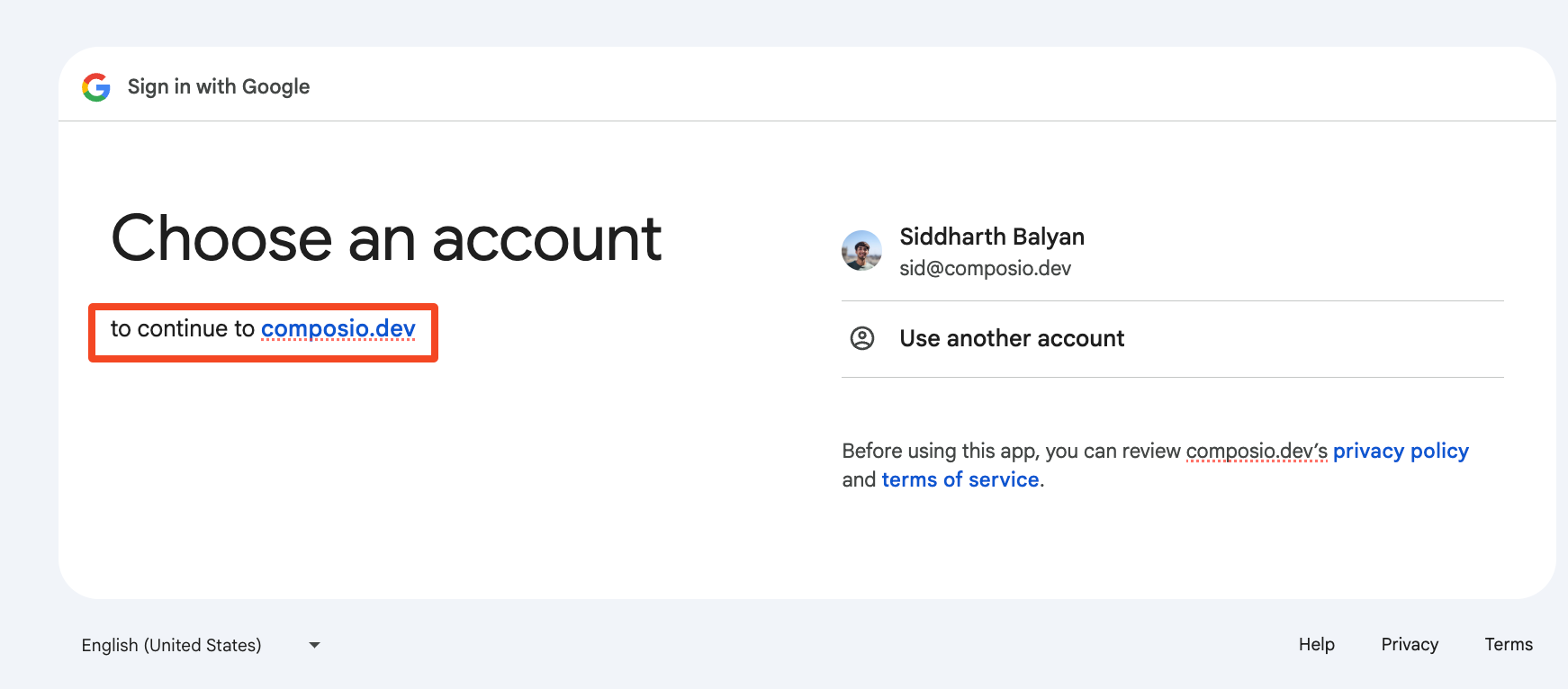
By default the users will see an OAuth screen like the one below:
Composio's Domain in OAuth Consent Screen
The OAuth redirect URL is surfaced in some OAuth providers' consent screens. This may cause confusion for some users as that URL is not of the same domain as the application.
Create a redirect logic, either through your DNS or in your application to redirect that endpoint to https://backend.composio.dev/api/v3/toolkits/auth/callback
Example: API Route for OAuth Redirect
from fastapi import FastAPIfrom fastapi.responses import RedirectResponsefrom composio import Composio# Create a FastAPI appapp = FastAPI()# Create a Composio clientcomposio = Composio()@app.get("/authorize/{toolkit}")def authorize_app(toolkit: str): # retrieve the user id from your app user_id = "<user_id>" # retrieve the auth config id from your app auth_config_id = "<auth_config_id>" # initiate the connection request connection_request = composio.connected_accounts.initiate( user_id=user_id, auth_config_id=auth_config_id, ) return RedirectResponse(url=connection_request.redirect_url)
NextApiResponse) { // The target Composio endpoint that handles OAuth callbacks constconst composioEndpoint: "https://backend.composio.dev/api/v3/toolkits/auth/callback"composioEndpoint = 'https://backend.composio.dev/api/v3/toolkits/auth/callback'; // Extract and preserve all query parameters constconst queryParams: URLSearchParamsqueryParams = newvar URLSearchParams: new (init?: string[][] | Record<string, string> | string | URLSearchParams) => URLSearchParams
The **`URLSearchParams`** interface defines utility methods to work with the query string of a URL.
[MDN Reference](https://developer.mozilla.org/docs/Web/API/URLSearchParams)
URLSearchParams();var Object: ObjectConstructor
Provides functionality common to all JavaScript objects.
Performs the specified action for each element in an array.
@paramcallbackfn A function that accepts up to three arguments. forEach calls the callbackfn function one time for each element in the array.@paramthisArg An object to which the this keyword can refer in the callbackfn function. If thisArg is omitted, undefined is used as the this value.
The **`append()`** method of the URLSearchParams interface appends a specified key/value pair as a new search parameter.
[MDN Reference](https://developer.mozilla.org/docs/Web/API/URLSearchParams/append)
Specify your custom redirect URI in the auth config settings!
Auth Config Settings
With this setup, you can use https://yourdomain.com/api/composio-redirect as your OAuth redirect URI, which will create a better user experience by keeping users on your domain during the OAuth flow.